ads2

Showing posts with label IOS. Show all posts

Monday, 17 February 2014

Parser View

With CLI view, we can restrict which access each network administrator have based on role.Superviews allow a network administrator to easily assign all users within configured CLI views to a superview instead of having to assign multiple CLI views to a group of users. 


Here is the basic configuration of the Parser View.


R2 <----> R3    
192.168.1.1   <---->  192.168.1.2


Task: 

  • Allowing telnet access with the username OPERATOR and password CISCO to be able to configure the HTTP feature in the router only.
  • Configure Username ADMIN and password CISCO to have access to every feature in the router.


aaa new-model
!
!
aaa authentication login default local
aaa authentication login VTY local
aaa authentication login CON none
aaa authorization exec default local
aaa authorization exec VTY local


username OPERATOR view HTTP password 0 CISCO
username ADMIN privilege 15 password 0 CISCO


parser view HTTP
 secret 5 $1$6ZRJ$CIjM5cdVUvhpinttlR/361
 commands configure include ip http
 commands configure include ip
 commands exec include configure terminal
 commands exec include configure
 commands exec include show running-config
 commands exec include show

Monday, 20 January 2014

Cisco IOS NAT on a Stick Configuration Example

NAT (Network Address Translation) is most commonly used to let users on our LAN access the Internet using a single public IP address but it can be used for some more interesting scenarios. Recently I encountered an interesting CCIE R&S task that had the following requirement:
"Make sure that whenever R2 responds to a traceroute it replies with the IP address on the loopback 0 interface"
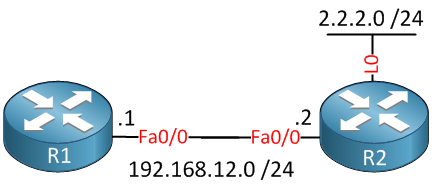
This sounds easy enough but there’s no such thing as a “traceroute source loopback 0″ command or anything alike. To make this work we have to configure the NAT on a stick feature. In this tutorial I’ll show you this is done. First of all, this is the topology that we will use:
Two Routers R2 Loopback Interface
There are only two routers that are directly connected to each other. R2 has a loopback 0 interface with IP address 2.2.2.0 /24. Let’s configure these IP addresses first: